Ghosthink: Adding Personality to Design with a Spooky Twist
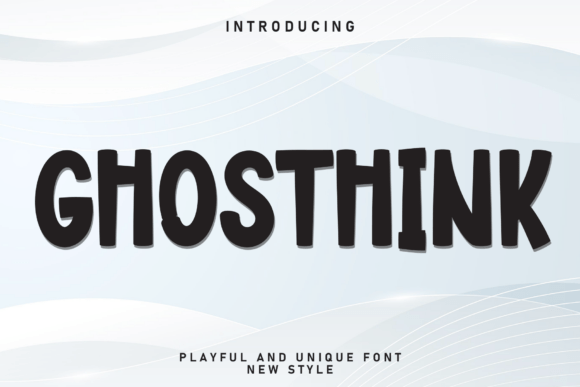
When it comes to choosing a font that stands out without overwhelming the message, Ghosthink delivers a unique blend of creativity and character. Designed with a playful yet eerie aesthetic, Ghosthink is a bold, irregular typeface that fits naturally into Halloween-themed projects, children’s crafts, quirky branding, and imaginative storytelling. Its offbeat letterforms bring a sense of fun and unpredictability, making it a go-to choice for designers who want to inject personality into their visual communication.
Understanding Ghosthink in the Design Workflow
Ghosthink isn’t just a novelty font—it serves a specific purpose in the design process. Whether you're crafting a book cover, designing promotional material for a seasonal event, or building a brand identity that leans into the whimsical or supernatural, Ghosthink can act as a central design element or a supporting accent. Its visual impact works best when used selectively, such as for headlines, logos, or key phrases that need to pop.
In a broader creative workflow, Ghosthink often comes into play during the visual development phase. After the core message or brand identity is defined, designers reach for fonts like Ghosthink to enhance the emotional tone of the content. It bridges the gap between concept and execution by translating ideas into a visual language that resonates with the intended audience.
How Ghosthink Fits Into Real-World Applications
Ghosthink’s quirky appearance might suggest limited use, but in practice, it adapts well to a variety of creative contexts. Here are some practical ways it can be integrated into different workflows:
- Halloween Marketing: Use Ghosthink in social media graphics, email headers, or event flyers to create a cohesive and eye-catching seasonal campaign.
- Children’s Media: Whether it's a book layout or an educational app interface, Ghosthink adds a playful edge that appeals to younger audiences without sacrificing readability.
- Brand Identity: For brands that want to stand out with a bold, unconventional personality—think boutique shops, themed cafes, or creative studios—Ghosthink can be part of a larger typographic system.
- Print-on-Demand Products: From t-shirts to greeting cards, this font works well in product designs that aim to capture attention and spark curiosity.
Preparing for Use: Compatibility and Setup
Before diving into a project with Ghosthink, it’s important to consider compatibility and formatting. As with any decorative font, readability can vary depending on size, spacing, and background contrast. Test Ghosthink in different formats—print, digital, and mobile—to ensure it maintains its impact without compromising legibility.
Most design platforms, including Adobe Creative Suite, Canva, and Figma, support Ghosthink through font file installation or built-in libraries. Always check licensing to ensure it’s cleared for both personal and commercial use, especially when working on client projects or selling merchandise.
Integration with Other Design Tools and Assets
Ghosthink shines brightest when paired with complementary design elements. Because of its bold and irregular nature, it works best alongside clean, minimalist fonts for body text or secondary information. Pairing it with a sans-serif like Helvetica or a handwritten font can create a balanced and visually engaging layout.
When working in a team or across platforms, make sure Ghosthink is either embedded or converted to outlines before exporting files. This prevents font substitution issues when collaborators or clients open the design without the font installed. If you're exporting for web use, consider converting text to SVG or PNG for consistent display across browsers.
Ghosthink in the Creative Process: Before, During, and After
Ghosthink doesn’t just appear at the end of a design—it plays a role throughout the creative lifecycle:
- Before: During the planning stage, Ghosthink can help shape the mood board or mockup. Sketching out concepts with this font gives an early sense of how the final design might feel.
- During: In the execution phase, Ghosthink becomes a key visual asset. Use it in headline text, logo variations, or call-out elements to reinforce the theme.
- After: Once the project is live, revisit how Ghosthink contributes to the overall user experience. Does it support the message? Is it legible in different environments? These insights can guide future design decisions.
Maintaining Consistency Across Projects
While Ghosthink is expressive, it should still follow a consistent application strategy. Define usage guidelines early—such as preferred sizes, spacing, and color combinations—to maintain a cohesive look across different materials. If you're using Ghosthink as part of a brand kit, include examples of how it pairs with other fonts and design elements to ensure long-term usability.
Consistency also applies to file management. Store Ghosthink font files in a shared asset folder or cloud-based design system so all team members have access. This streamlines collaboration and reduces formatting errors when projects are handed off or updated.
Workflow Tips for Efficient Use
To make the most of Ghosthink without slowing down your workflow, consider these practical tips:
- Use Ghosthink Sparingly: Overuse can lead to visual clutter. Stick to headlines, titles, or short phrases where the font can have the most impact.
- Test Across Devices: Always preview your design on different screens to ensure Ghosthink remains legible and effective in all contexts.
- Keep a Style Guide: Document how Ghosthink is used in your projects, including recommended color palettes, spacing rules, and acceptable font pairings.
- Back Up with Web-Safe Fonts: If embedding Ghosthink in a web project, provide a fallback font in case it doesn’t load properly.
- Export Smartly: When exporting files for print or web, convert Ghosthink text to outlines or embed the font to avoid display issues.
Long-Term Use and Adaptability
Ghosthink isn’t just for Halloween—it’s a versatile typeface that can evolve with your creative needs. Whether you're designing seasonal promotions, launching a quirky brand, or developing a themed educational resource, Ghosthink offers a consistent way to express personality through typography.
As trends shift and design preferences change, Ghosthink retains its value through its distinctiveness. By integrating it thoughtfully into your design process, you ensure that it enhances—not overshadows—your creative message. When used with intention and care, Ghosthink becomes more than just a font; it becomes a signature element of your visual storytelling toolkit.